
An AI team for the new products in your shop
In The Office, which runs in your browser and in German, you tell Nora, the team lead, what a product needs. She plans it with a price, and once you approve, the team makes the images and the listing copy.
How a job runs
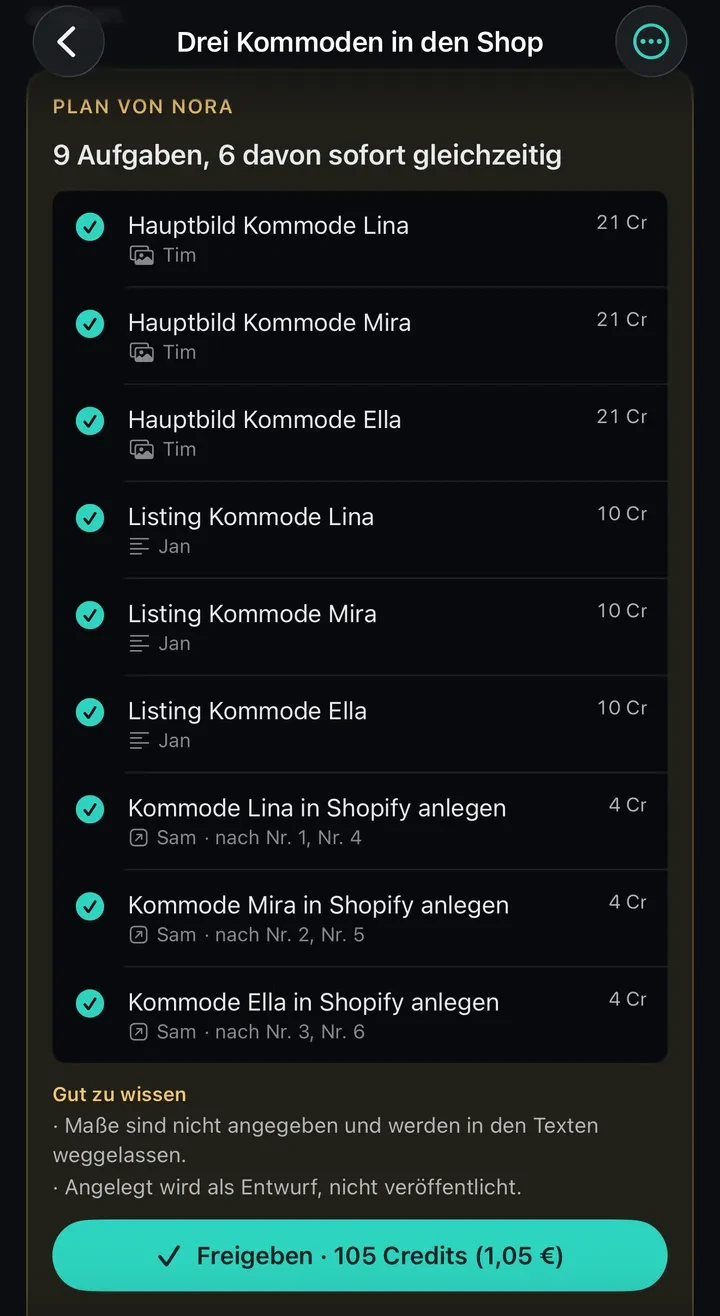
Screenshots from the preview of the iPhone app, in German and not on the App Store yet, with an invented company. Sam is a coworker the company hired itself.
You write, Nora plans
Each line is a task with an owner and a price, worked out by the server, not the AI.
You decide here
You approve the plan
So far only the planning has cost anything, 3 credits.
The team works, Nora signs off
Depending on your plan, up to eight tasks run at once, and from Pro on Nora checks Tim’s and Jan’s work.

You decide here
Anything going outside waits for you
When a coworker wants to create or change something in your shop, by default it waits for you.
The results stay with the job
You or a coworker of your own with a connection take them to your shop.

More about the steps
- Photos: up to eight per job, up to 12 MB each. Images need a product photo; a link to the product page is not enough.
- You can strike single lines from the plan. Under “Gut zu wissen” (good to know) Nora notes what is missing; if the request gives no dimensions, the copy leaves them out.
- The approve button shows the amount in credits and euros, and the server checks that your balance covers it.
- From Pro on, Nora puts every image and listing from Tim and Jan next to your photo and is to name any difference precisely, such as “studio image shows four shelves, reference has three”. Work goes back once at most, and only if something differs and the budget allows. The result then says “abgenommen” (accepted) or “noch offen” (still open).
- Only tools set to “fragt” (asks), the default, stop before acting outside. Under “Freigaben” (approvals) you can still edit the title, and similar actions come as a bundle, such as three products at once.
- You copy the title, bullet points, description and search terms with one button each. A coworker of your own with a Shopify connection creates the product as a draft.
Who works with you, by plan
Nora
Team leadPlans with a price and hands out the tasks; from Pro on she signs off the work.
Tim
Product imagesMakes a main image on white, room scenes and more views from your photo.
Jan
Listing copyWrites listings in Amazon format, using only what your information backs up.
Vasily
Company knowledgeIn developmentIs meant to look things up and file them in The Brain once The Office is connected.
SoonMia (customer service) and Leo (shop and marketplaces) are planned.
| Role | Free | Starter | Pro | Business |
|---|---|---|---|---|
| Nora | included | included | included | included |
| Tim | not included | not included | included | included |
| Jan | not included | not included | included | included |
| Vasily | not included | not included | not included | included |
| Your own coworkers | not included | not included | not included | included |
| Tasks at once | 1 | 2 | 4 | 8 |
On Free and Starter, Nora works alone with all built-in tools, without sign-off.
What Tim, Jan and Vasily do in detail
- Tim’s image types: main image on white 1:1 (newly rendered, not cut out of your photo), room scene 4:3, detail 1:1, three-quarter view 4:3, size comparison 1:1. If you don’t say how many, Nora plans three images per product.
- Jan writes a title up to 75 characters, five bullet points up to 200 characters, a description and search terms.
- Once The Office is connected to your Brain, Vasily files what should last there as a dossier with its source, without approval.
What a job costs
| Making the plan | 3 credits |
|---|---|
| Image task with 1 image | 40 credits |
| Image task with 2 images | 55 credits |
| Listing | 10 credits |
| Task using a connection, such as creating in Shopify | 4 credits |
A product with a main image and a listing: 53 credits including planning, or 0.53 €.
The plan price is the frame.
If a task needs more than a quarter more (at least 5 credits of leeway), it stops and asks you.
When something doesn’t fit
- An image differsFrom Pro on, Nora sends it back for rework once at most.
- Information is missingThe team leaves it out instead of estimating it.
- No product photoThen Nora plans no images.
How prices add up, and the first real job
- An image task costs 10 credits plus 15 per image. Another 15 are included for one round of rework and only charged if it happens. A task using a connection costs 3 credits plus 1 per call.
- When a task stops, it asks under “Freigaben” (approvals) whether to carry on. If an image still doesn’t match after rework, it says “noch offen” (still open), and you decide whether to use it.
- On 29 September 2026, on a job without a photo, the image model drew an oak cabinet instead of a white bedside table.
The first real job, 26 September 2026
“For this shoe cabinet: one Amazon main image on a white background and one Amazon listing. Leave out the dimensions.”
On Business
Your own coworkers and connections
Describe a job in one sentence, and The Office proposes a coworker with a role and tools for you to confirm.
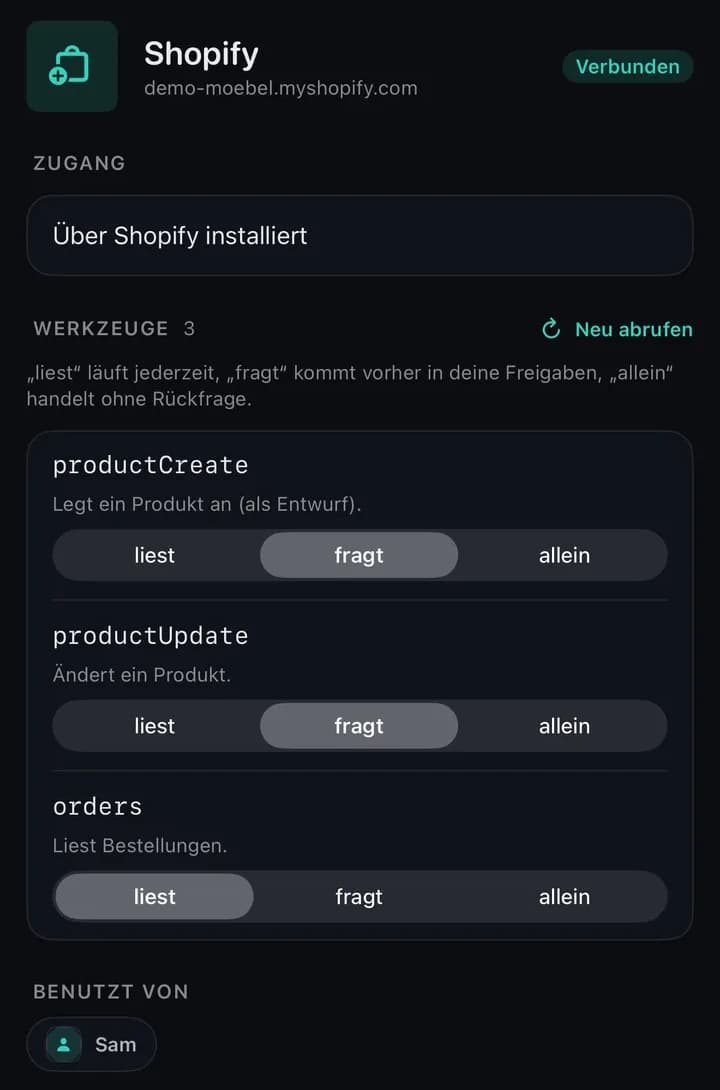
You connect Shopify with your own admin app, other systems such as Odoo with an MCP server. For each tool you choose:
- “liest” (reads)For queries; runs without asking, even if it changes things.
- “fragt” (asks)Waits for you before every call; that is the default.
- “allein” (alone)Runs without asking, also when creating or changing.
Separate teams with their own lead
In developmentUntil then, every coworker works under Nora.
More about coworkers and connections
- The Office only proposes tools your company really has; anything that doesn’t fit is listed as discarded. You set who the coworker reports to when you confirm.
- There is no Shopify App Store listing yet. Access and tool names in the picture come from the preview.
- The real Shopify connection creates products, as drafts unless asked otherwise, and changes products, images, variants and stock.
- “liest” is not a lock: a tool that creates or changes things runs without asking on “liest” just as on “allein”.
Jobs on a fixed schedule
In The Office they are called “Dienstpläne” (duty rosters): at the set time a job goes to Nora.
- WhenTime and weekdays, for example weekdays at 8:00.
- ApprovalWithin your budget, the plan approves itself.
- ImagesNone, because a schedule brings no photos.
- CostLike the same job by hand.
Approval and failures in detail
- If the plan costs more than your budget, it waits for you. Tools set to “fragt” (asks) still ask before every action.
- Copy and look-ups through a connection work without photos.
- If a schedule fails to start five times in a row, for example because your balance is too low, it is paused. A slot missed by more than six hours is skipped and counts towards that.
One example
Yesterday’s revenue
Weekdays, 8:00
“Tell me yesterday’s orders and revenue, briefly.”
Needs a connection of your own that reads orders.
No. All you need is a browser and the same account as for The Vision, The Author and The Brain.
A language model with a fixed role, its own instructions and specific tools. Only a coworker with the image tool makes images, and only one with a connection writes to other systems. There is no dedicated tool for landing pages or other website copy.
In The Office Jan writes one version in Amazon format. For eBay, OTTO or your own shop you use The Author directly. There you pick the marketplace, and a rule check without AI shows whether the text keeps to that marketplace’s limits and rules.
We can’t guarantee it, because the image model redraws the whole picture, the product included. In The Vision, where nobody checks, we discarded three of six images of our own shoe cabinet. So check every image at full size.
Try it on one product from your catalogue
Create an account, upload the photos of one product and look at what comes back.
No credit card needed.