
Your shop’s company knowledge in one place
The Brain holds dimensions, materials, delivery times and your rules for customer replies, one dossier per product or topic. The Vision, The Author and Conciva read from it.
The Brain comes with every account. Uploading and sorting cost no credits.
Where your details show up again
The Vision uses the line from the price list, and Conciva keeps to your rule.
1 · What you put in
price-list-2026.csv
| Item | Material |
|---|---|
| Lina chest | Solid oak, oiled |
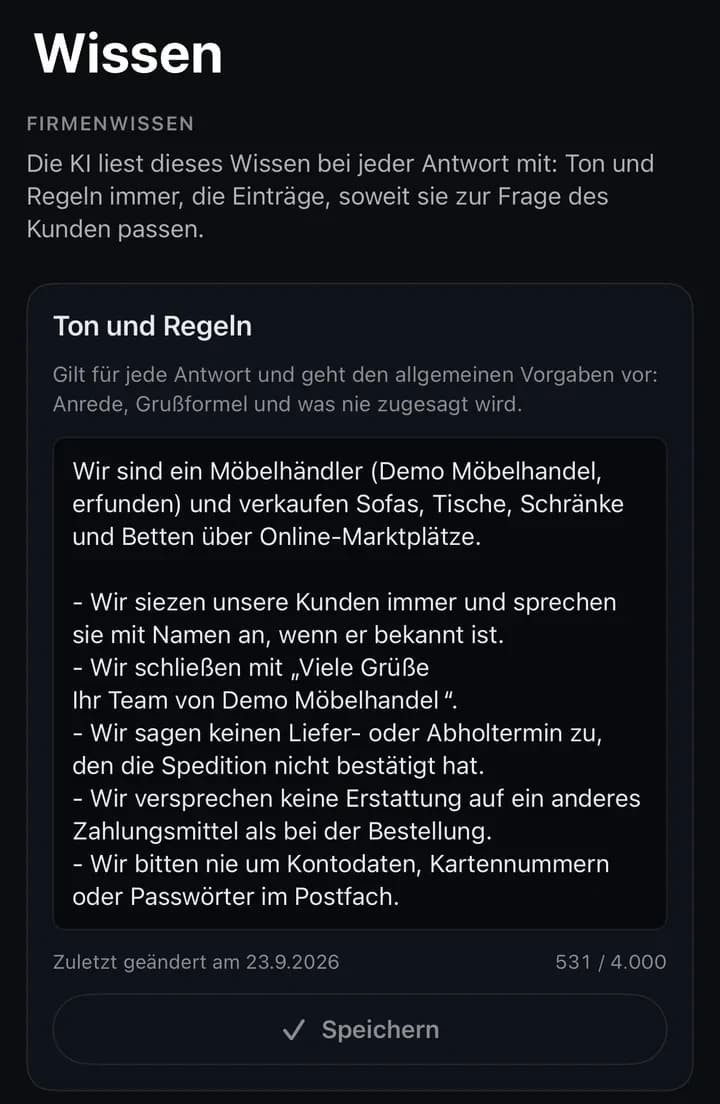
From “tone and rules”
We never promise a delivery or pickup date the carrier hasn’t confirmed.
2 · What The Brain stores
Lina chest
- Material
- Solid oak, oiled
- Read by
- The Vision
Tone and rules
- Read by
- Conciva
3 · Where it shows up
The Vision · image scene
Living room in daylight, wood tone true to solid oak, oiled, grain visible
Conciva · reply draft
Customer asks: “Will the Lina chest arrive by Friday?”
We’ll give you the delivery date as soon as the carrier has confirmed it.
How knowledge gets into The Brain
Passwords, bank details and individual customers’ data stay out.
Put it in
You upload a CSV in the browser or write a paragraph, such as your return rules.
Check the suggestion
The Brain first shows each dossier’s title and folder, then you accept or discard it.
Keep it current
If The Brain recognises a dossier by its title, a new price list replaces only the affected section.
Files and limits
- Who
- Owners and admins of your company, in the browser at brain.inomerce.com.
- Files
- CSV, TXT, Markdown, JSON. Save Excel as CSV first.
- Size
- Up to 8 MB per file. The Brain reads the first 48,000 characters, about 400 rows for a CSV.
- Per run
- Up to 8 dossiers, new or updated. Upload a long price list in parts.
- PDF and RTF
- Not in the browser. Soon via the Conciva app, as customer service entries.
- Dossiers
- One per product or topic, with sections such as dimensions, material or care. Each lists the files its details came from, and the suggestion shows beforehand whether a dossier is updated or created.
Who reads it
The Brain assigns each dossier to matching apps itself when you upload. The folder counts too.
The Vision
Product images
Assigned dossiers and everything in folders with “Product” in the name.
The Author
Listing copy
Only the “Listing Texte” folder, meant for tone and banned claims.
Conciva
Customer service
“Tone and rules” with every draft, plus the entries for support.
The Office
Jobs for the AI team
In developmentNora looks things up here once The Office is connected to your Brain.
Exactly what each app reads
- The Vision
- Dossiers with the audience Vision and everything in folders with “Product” or “Produkt” in the name, the 30 most recently changed at most.
- The Author
- Everything in the “Listing Texte” folder and its subfolders, the 30 most recently changed at most. The folder is meant for tone, required terms and banned claims.
- Conciva
- Entries with the audience “Support” or in folders with “Support” in the name, up to a limit. If there are more, Conciva picks the ones that match the customer’s question. Order data comes from OTTO or Odoo when needed, not from The Brain.
- Folders
- The Vision and Conciva read everything in their folders, whatever audience is set there.
- Brain only
- Notes for yourself. No app reads them as long as the dossier isn’t in a product folder or in “Listing Texte”.
- In the browser
- In Conciva in the browser, each conversation shows under “Wissen” which dossiers a draft would be based on. You edit the knowledge only in The Brain.
What gets in without approval, and what doesn’t
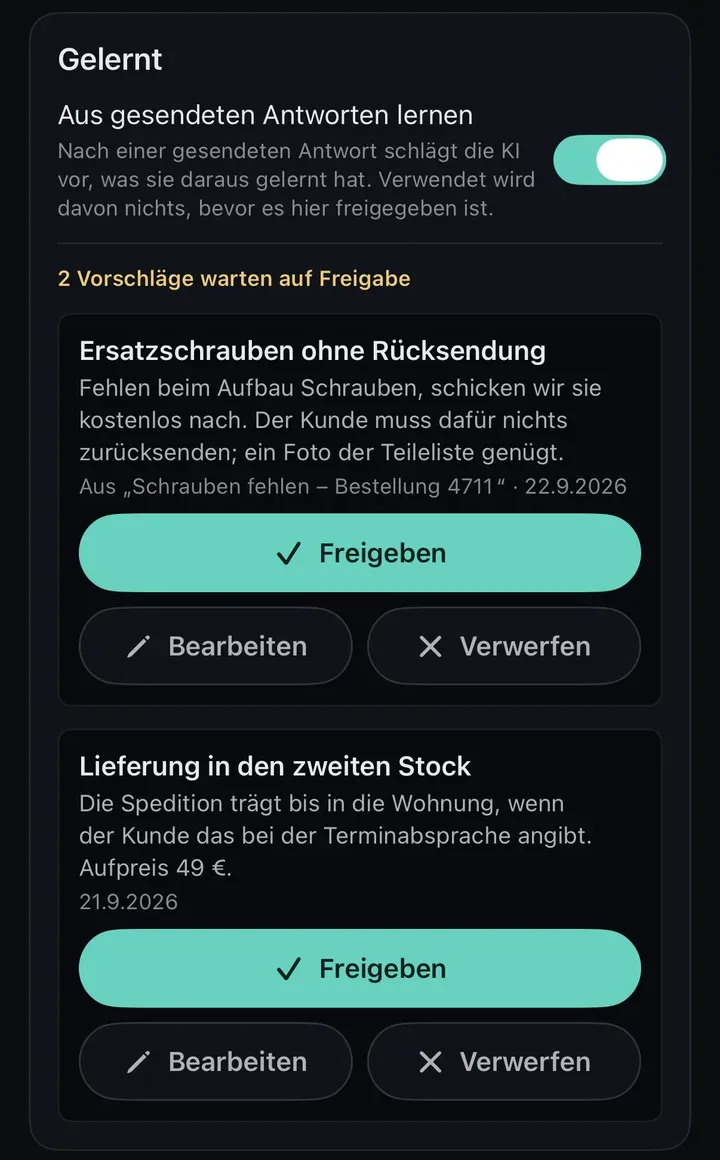
Learned from conversations
In developmentWaits in the inflow queue (“Zufluss”) until someone approves or discards it.
Learned in Conciva
SoonAfter sent replies, the AI suggests what it learned. This is off by default.
Filed from The Office
In developmentNora files there directly, without approval. On Business, Vasily does too.
Cleanup
Merges duplicate notes into one dossier and archives the individual notes.
Details
- The Author will send every finished listing conversation to the inflow queue once it is connected to your Brain.
- In Conciva the switch is called “Aus gesendeten Antworten lernen” (learn from sent replies). It is only in the iPhone and iPad app.
- Dossiers filed by Nora or Vasily can be edited or archived like any other.
- Archived notes can be restored.
Where your knowledge is stored
The Brain runs in London. The AI isn’t trained on your knowledge, and other companies don’t see it.
Privacy policyPrivacy in detail
- Stored
- The Brain (Vercel) and its database (Supabase) run in London. Vercel is a US company, so a transfer to the USA is possible.
- AI
- Google Gemini through the paid API, with no training on your content. Gemini receives what you upload, the conversations an app learns from and what an app reads for a task.
- Who sees it
- The people with access to your company account and the apps that read from it.
- Export and deletion
- On request by email to support@inomerce.com
Not reliably. Neither app searches for the product at hand. So give the dimensions of a specific product yourself, in The Vision in the chat, in The Author in the form.
Yes, if the source is wrong, such as an outdated price list. Then you upload the correct version or edit the dossier by hand. Anything an app produced with the wrong detail before that stays as it is, so check those images, listings or drafts yourself.
Start with your price list
Create an account and upload your price list to The Brain as a CSV. You see a suggestion first, and nothing is saved until you confirm it.
No credit card needed.