
What connects today, and what is still coming
Conciva and The Office are connected today; for catalogue and listings there is no fixed connection yet.
Conciva: three channels and Odoo
- Mirakl marketplacesThrough Mirakl’s seller inbox, attachments included.
- OTTO MarketConciva reads the OTTO mailbox over IMAP and replies over SMTP.
- Amazon buyer messagesConciva fetches only the emails from Amazon’s relay address and replies to it.
- OdooRead only: order and invoices at a click, and you attach the PDF.
Conciva has no general email channel, and Shopify sends it no customer messages.
Details
- Mirakl: you enter the marketplace’s Mirakl address and your API key.
- OTTO Market: OTTO sends customer enquiries by email. With access to OTTO’s orders interface the order data comes along, without Odoo.
- Amazon: Amazon offers no interface for fetching buyer messages and replying to them freely. Buyer messages reach your mailbox through the relay address, and Conciva picks up only those emails.
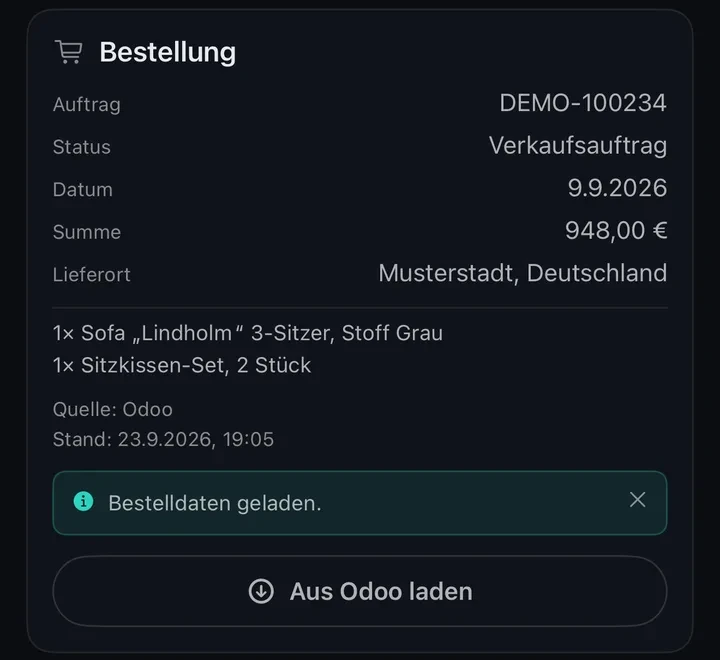
- Odoo: a click on “Aus Odoo laden” (load from Odoo) brings in the order, status, date, total, delivery place, order lines and posted invoices.
The Office: your own connections
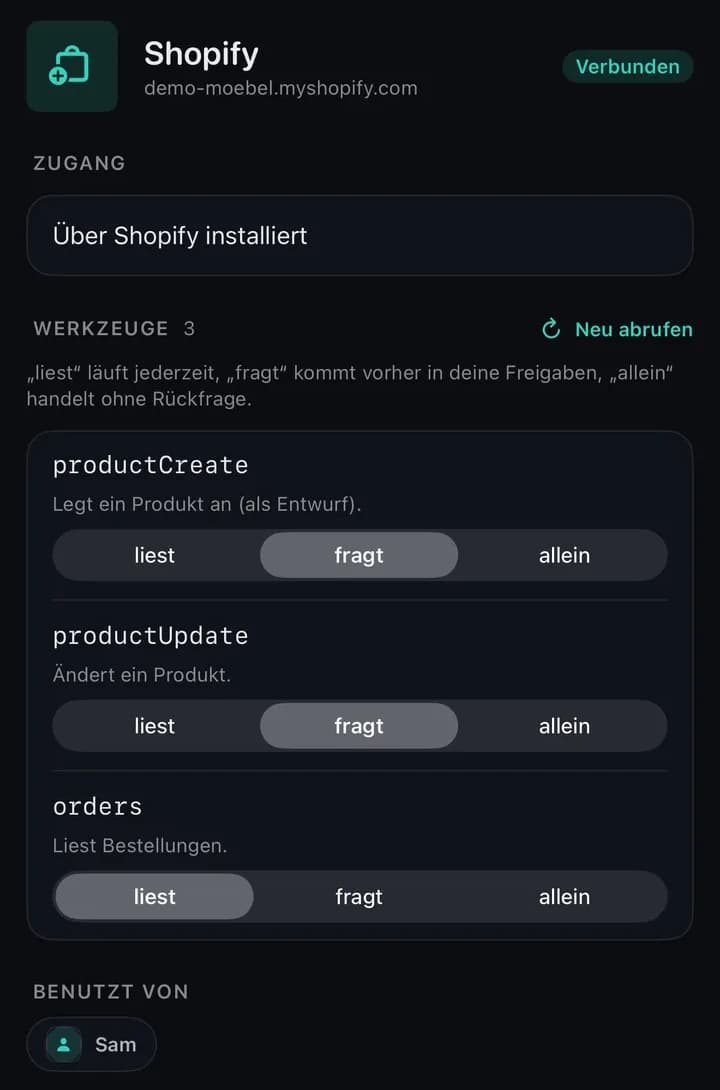
On the Business plan you connect your own systems such as Shopify or Odoo, and set for each tool how far it may go.
- liestReads. For queries such as products or stock. Runs without asking, even if it changes something.
- fragtAsks. Waits for your approval before every call, also when unset.
- alleinAlone. Runs without asking, even when it creates or changes things.
Details
- You connect Shopify through an admin app of your own and Odoo through an Odoo MCP server you run alongside it. Any other service with an MCP interface works the same way.
- A task using a connection costs 3 credits plus 1 per call.
- A tool on “fragt” waits under Approvals, with the full content of the call.
- The Shopify app is not listed in the Shopify App Store yet.
- Sam in the picture is a coworker the demo company hired itself.
Today through links and files
Product link in The Author
Takes brand, SKU, GTIN, price, dimensions and attributes, but no variants.
Photos for The Vision
You upload up to 14 per chat; a shop link is not enough.
Listings from The Author
As text, CSV or Excel. You upload them yourself.
Images from The Vision
Exported in the browser as JPEG, free of charge and never cropped.
Formats and limits
- Product link: any https page. Reading it is free; up to eight images it finds are analysed at 5 credits each.
- Photos: JPEG, PNG or WebP up to 20 MB.
- Listings: one row per listing and one column per bullet point, for example for your marketplace’s template.
| Amazon main image | 1:1 · 2048 px · white background |
|---|---|
| Amazon & shop lifestyle | 1:1 · 2048 px |
| Square marketplace (OTTO, Kaufland, Home24) | 1:1 · 1500 px · white background |
| Web shop banner | 16:9 · 1920 px |
| Original | full size |
In development
Shopify catalogue (Merchant Sync)
Keep products, variants and images current in Shopify.
Amazon listings
Hand listings from The Author straight to Amazon.
Odoo catalogue
Product data from Odoo as the basis for images and copy.
Google Ads
For campaigns; the scope is not settled yet.
Missing a system? Tell us which one.
Write to hello@inomerce.comStart with a marketplace you already use
Create an account and connect a Mirakl marketplace, OTTO Market or the Amazon buyer mailbox in Conciva. On the first connection, Conciva fetches the messages of the last 30 days.
No credit card needed.